


OBD4
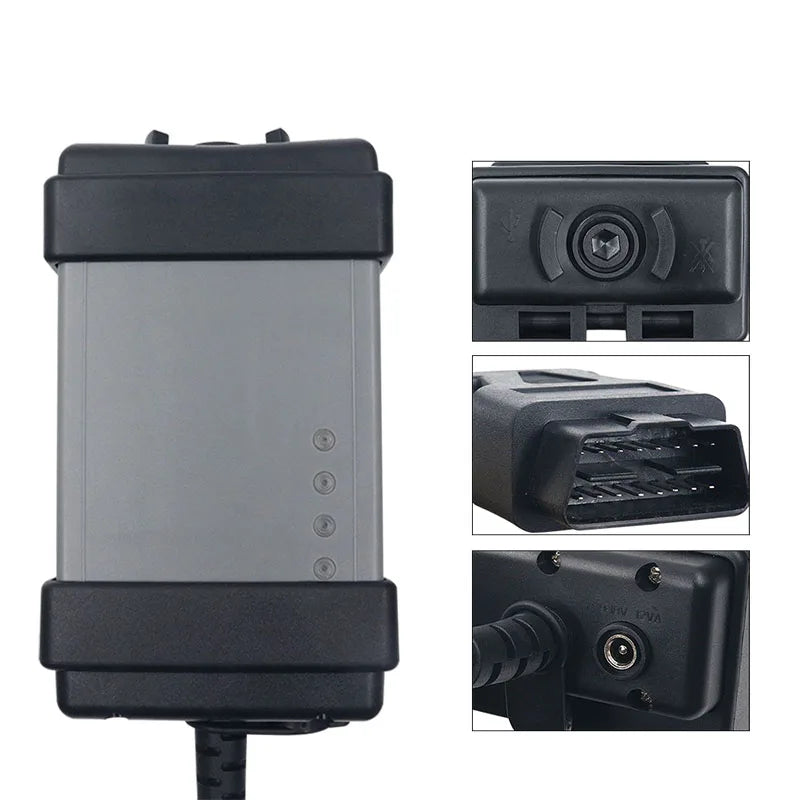
Professional Diagnostic Dice with J2534 or Full Chipset M32c for Volvo VIDA
Professional Diagnostic Dice with J2534 or Full Chipset M32c for Volvo VIDA
Couldn't load pickup availability
This DiCE‑style Diagnostic Interface for Volvo is an essential OBD‑II tool for deep, dealership‑style diagnostics on Volvo vehicles when used together with compatible software such as VIDA 2014D and VDASH. Designed for technicians, workshops, and enthusiasts, the DiCE‑type interface enables full‑system scanning, live data, guided diagnostics, calibrations, and service functions on a wide range of Volvo models.
Choose from two optimized hardware versions:
- Full‑Chip M32C – maximum VIDA 2014D compatibility for approx. 1999–2014 Volvos
- J2534 Pass‑Thru – versatile, standardized interface that also works with modern tools like VDASH and other J2534‑based applications
This tool is ideal for anyone who wants a reliable, professional hardware interface for Volvo fault diagnostics, module communication, advanced configuration, or performance‑oriented software work using VIDA/VDASH or other compatible software.
✔ Hardware & Support Included
- DiCE‑style interface for Volvo (choose Full‑Chip M32C or J2534 version)
- Setup and installation guides (PDF & video) for use with VIDA 2014D and VDASH
- Optional Virtual Machine (preconfigured Windows image) or native installation instructions
- SM2‑USB drivers (for J2534 variant)
Tool Type Comparison
Full‑Chip M32C DiCE (Recommended for VIDA 2014D users)
- Best compatibility for approx. 1999–2014 Volvo models when used with VIDA 2014D
- Works reliably with legacy K‑Line and early CAN modules
- Typically no extra driver installation required
- Perfect for workshops using VIDA 2014D as their main diagnostic platform
J2534 Pass‑Thru DiCE
- Industry‑standard J2534 interface inside the DiCE‑style housing
- Compatible with VIDA and third‑party tools such as VDASH and other J2534‑based suites
- Requires the included SM2‑USB driver
- Ideal for users who want modern coding, key programming, or ECU updates via VDASH (subject to software license and vehicle support)
Both versions support a broad range of Volvo vehicles, module communication, and VIDA/VDASH‑style functionality when used with the appropriate software.
A. What You Can Do With DiCE‑Style Interface + VIDA 2014D
(Dealer‑style diagnostics for MY ~1999–2014, depending on software and vehicle support)
- Full‑System Diagnostics
- Automatic VIN & vehicle profile detection (where supported)
- Scan all modules (ECM, TCM, ABS, SRS, CEM, DEM, REM, IAM, DIM, BCM, etc.)
- Read/clear Volvo‑specific DTCs with detailed descriptions
- View freeze‑frame data & fault conditions
- Check module communication & network status (CAN/K‑line)
- Live Data & Real‑Time Monitoring
- Monitor engine parameters (boost, fuel pressure, O2 sensors, trims, MAF, temps, etc.)
- Track transmission values (oil temperature, gear state, adaptation data)
- View ABS/ESP wheel speeds, brake pressure, yaw rate
- Display and graph data during road tests
- Log data for later analysis
- Guided Diagnostics & Repair Procedures
- Access to Volvo‑specific service information when available in your VIDA installation
- Guided step‑by‑step troubleshooting for each DTC
- Wiring diagrams & component location maps
- Linked instructions for repairs and recalibrations
- Service & Maintenance Functions
- Reset service reminder / maintenance counter
- EPB (Electric Parking Brake) service mode
- SAS (Steering Angle Sensor) calibration
- Throttle body adaptation
- Transmission adaptation reset
- Support for brake bleeding (ABS pump activation)
- Fluid & counter resets (where supported by vehicle and software)
- Actuator Tests / Output Controls
- Turn on fans, pumps, valves, injectors
- Test turbo actuators, EGR valves, solenoids
- Activate relays and communication lines to confirm component function
- Vehicle Information & Module Overview
- View module software versions
- See installed equipment/options
- Read component identification and hardware part numbers
Note: VIDA 2014D does not support software downloads/flashing without an official Volvo subscription and valid credentials.
B. What You Can Do With DiCE‑Style Interface + VDASH
(Advanced coding + modern configuration for MY ~1999–2025, software/license and vehicle‑dependent)
- General Diagnostics
- Read/clear all DTCs across supported Volvo platforms (P1, P2, P3, SPA, CMA, Polestar 1/2 – subject to VDASH coverage)
- Readiness monitors (useful for emissions testing)
- Live data logging with advanced visualization
- Service Functions
- Reset SRI (service reminder indicator)
- Track technical inspection deadlines
- Manage & store service history
- Print service protocols for customers
-
Vehicle Configuration & Feature Coding
(Where supported by VDASH and specific vehicle)
- Disable auto START/STOP
- Enable video‑in‑motion (where legally allowed and technically supported)
- Activate independent parking heater
- Enable cruise control after retrofit
- Switch region (USA ↔ EU) including lighting & chimes
- Change dashboard/infotainment languages
-
Key & Security Programming
(Strictly security/feature‑dependent)
- Decode CEM/ECM PIN codes (where supported)
- Program new keys & remove lost/stolen keys
- Pair SCL and SCU immobilizer modules
- Sync replacement ECUs (security‑ and license‑dependent)
- Module Cloning & Advanced Coding
- Clone CEM/ECM/other modules (platform‑dependent)
- Injector coding for precise fueling
- Module identity alignment (VIN, configuration sync)
- Full vehicle configuration backup/restore
-
Performance & Software Enhancements
(Where legally and technically permitted)
- Engine performance tuning via software changes
- Remove the 180 km/h speed limiter (MY2021+, where supported)
- Improve throttle response or torque characteristics (engine‑specific)
- Optional VDD Dongle Integration
- Automatic driving logbook
- Trip tracking & statistics
- Remote vehicle monitoring (where supported)
Specifications
-
Communication: USB
-
OS Compatibility: Windows 7, 10, 11
-
Minimum System Requirements:
- 3GB RAM or more
- 40GB+ free disk space
- Internet Explorer 9 (VIDA component requirement)
- NTFS storage
-
Languages:
- VIDA: primarily English (local language packs depending on installation)
- VDASH: multiple languages (software‑dependent)
-
Supported Vehicles:
- Using VIDA 2014D: approx. 1999–2014 Volvo models (per VIDA coverage)
- Using VDASH: approx. 1999–2025 Volvo models (feature‑dependent and license‑dependent)
Important Notes & Legal Notice
- Actual coding/programming support depends on model year, modules, software versions, and your VDASH/VIDA licensing.
- Keep vehicle battery voltage stable during diagnostic and coding tasks (use a charger for long sessions).
- Use only authorized, legally sourced software and accounts.
Trademark notice: “Volvo”, “VIDA”, “DiCE” and “VDASH” are trademarks or product names of their respective owners. They are mentioned here only to describe compatibility and intended use with this aftermarket diagnostic interface. This product is not manufactured, endorsed, or authorized by Volvo Cars or any other OEM or software publisher.
Share


Impeccable. J'ai pu faire mon diag, régler ma pompe.
Nickel.
The software is difficult to install, had to return the tool.
calidad mejor de lo esperado, gracias.
I thought it would be hard, but it & actually simple to set up.
Took me 2 hours to get VIDA running, but now it's fine.
